What are the switchBox DIN / switchBoxD DIN / switchBoxDC DIN controllers used for?
Controllers from the switchBox DIN range are used for the remote and automatic control of electrical circuits (on/off). The devices function as Wi-Fi-controlled relays, mounted directly on a DIN rail within an electrical distribution board.
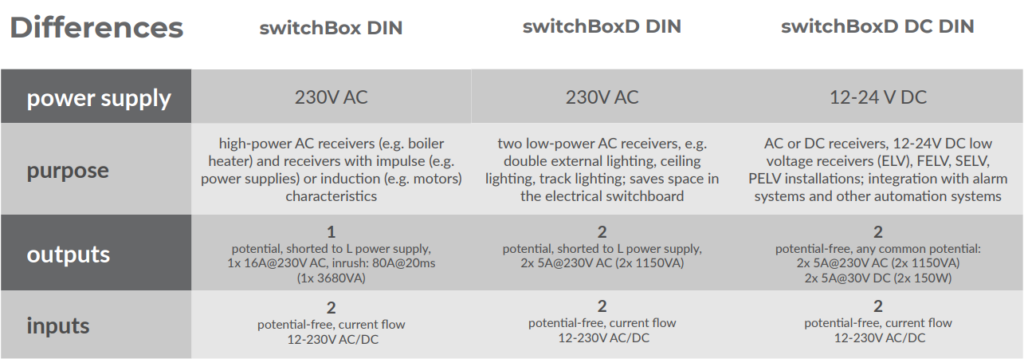
What is the difference between the switchBox DIN, switchBoxD DIN and switchBoxDC DIN controllers?
The differences between the switchBox DIN, switchBoxD DIN and switchBoxDC DIN controllers mainly relate to their power supply, intended use, and the type and number of outputs.
Can a push-button be connected to the switchBox DIN / switchBoxD DIN / switchBoxDC DIN controllers?
Yes, monostable (bell-type) or bistable (traditional, cross-type) push-buttons without backlighting are supported
What is the initial state of the switchBox DIN / switchBoxD DIN / switchBoxDC DIN controller after a power reset?
As configured by the user (last setting, opposite, off, on)
Is it possible to switch on the switchBox / switchBox LIGHT / switchBoxT PRO controller for a specific duration?
Yes, ‘timed’ activation can be set via the control screen (the value must be set in the controller’s settings) or via a physical button – action (trigger: ‘activate for a set time’). These times can vary; for example, 2 minutes when the physical button connected to the IN input is pressed, and 10 minutes when switched on via the app. Each subsequent activation of the timed switch whilst the countdown is in progress starts counting from a new value. For example, if we have a button with a 2-minute “time-based activation” option, we switch on the light using it and, after one minute, press the button again; the light will only switch off 2 minutes after the button was last pressed.