What is the device used for?
AirSensor is a miniature air quality monitor with a Wi-Fi module that detects the presence of harmful PM2.5 and PM10 particulate matter. The device features multi-coloured LEDs indicating the current air quality – green (good air), yellow (moderate), red (poor). The brightness of the LEDs is subtle enough not to disturb you at night, yet bright enough for a quick assessment of air quality – and, of course, they can be switched off.
How can the AirSensor
be powered? The AirSensor offers two flexible power supply options tailored to different installation conditions. The device can be powered by 12–24 V AC/DC via the detachable terminal block located on the right-hand side of the board once the casing has been removed. Alternatively, a 5V power supply can be used via the microUSB connector situated on the left-hand side of the circuit board. This method is particularly convenient as it allows the use of standard mobile phone chargers or power banks, making the device more portable and easier to install without the need to tamper with the electrical wiring.
The device’s power consumption is very low – less than 1W in standby mode and a maximum of 2W when active. This means that the airSensor can operate for a relatively long period even when powered by a power bank, which is particularly useful for temporary air quality monitoring in various locations, e.g. on a plot of land.
When connecting the device, please bear in mind the basic safety rules: do not connect both power sources at the same time, as this may damage the sensor.
How do I make my AirSensor available for air quality maps?
To make your AirSensor available for the BleBox public air quality map, go to the device settings, set the ‘Show on air quality map’ option to ‘Yes’ and set the installation location to ‘Outdoors’. This setting automatically constitutes consent to send measurement data to the publicly accessible air pollution map available at blebox.eu and to archive this data along with the location. Sensors installed indoors are not displayed on the map.
The basic requirement is for the device to have a constant internet connection via Wi-Fi, as the data must be regularly transmitted to the BleBox servers. Before activating this feature, it is worth ensuring that the device’s location is correctly set in the wBox app so that measurements are assigned to the correct spot on the map.
For users concerned about privacy, the option ‘Use approximate location for sensor data’ is available. This feature allows you to maintain your privacy if you do not want the device to be pinpointed with high precision on the air pollution map. Thanks to this option, you can still participate in community-based air quality monitoring in your neighbourhood, whilst not revealing the exact address where the sensor is installed.
Sharing data from the airSensor supports the development of an independent air quality monitoring network, which helps other users make informed decisions about ventilating their homes or planning outdoor activities. The map is publicly available and displays current readings from all connected airSensor devices in real time.
Where is the best place to install the airSensor?
The airSensor can be installed both inside and outside a building, allowing for comprehensive air quality monitoring in a variety of locations. In the wBox app, you must set the installation location to either ‘indoors’ or ‘outdoors’ so that the device can correctly interpret and display the measurement data.
The airSensor should be installed in a location sheltered from direct exposure to rain and other precipitation, e.g. in a window recess. The device has an IP32 protection rating.
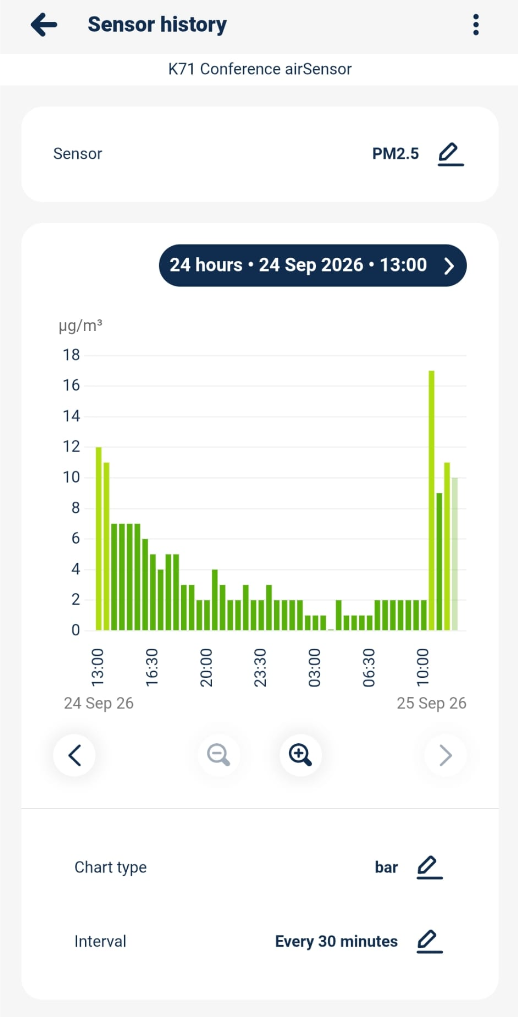
Is it possible to view the measurement history and create data graphs using the AirSensor?
Yes, the sensor offers full data history and interactive graphing functionality for all parameters. To use this feature, the controller must be connected to a Wi-Fi network. Measurement data is stored on the servers for one year, and for archiving purposes, it can be exported to .csv and .xlsx formats.
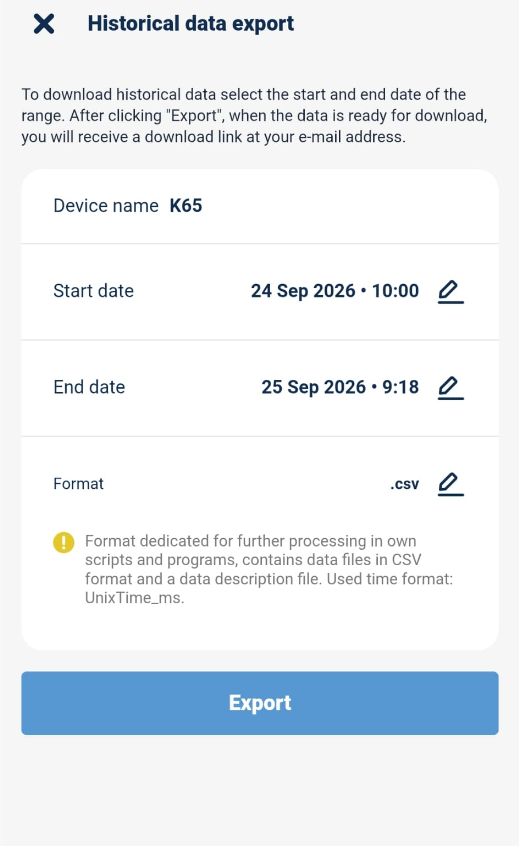
The data recording interval varies depending on the time period: for data from the last week, the interval is 5 minutes; for data from the last month, it is one hour; and after one month, the data is aggregated to a one-day interval.
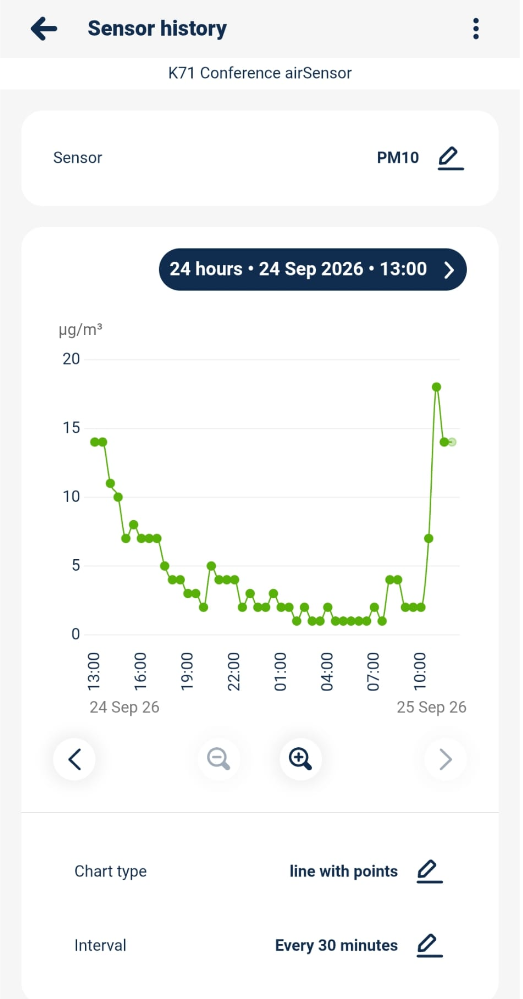
For controllers with multiple sensors or data types, the user can choose which sensor and which data to display on the graph. You can also change the graph type to customise the data presentation to suit your preferences.